Configure, validate, and recover the plugin
This guide explains Help4 CDN 0.2.2 settings, authenticated plan discovery, hosting-origin identity, requested versus effective state, and updates. Screenshots show the earlier 0.2.1 interface.
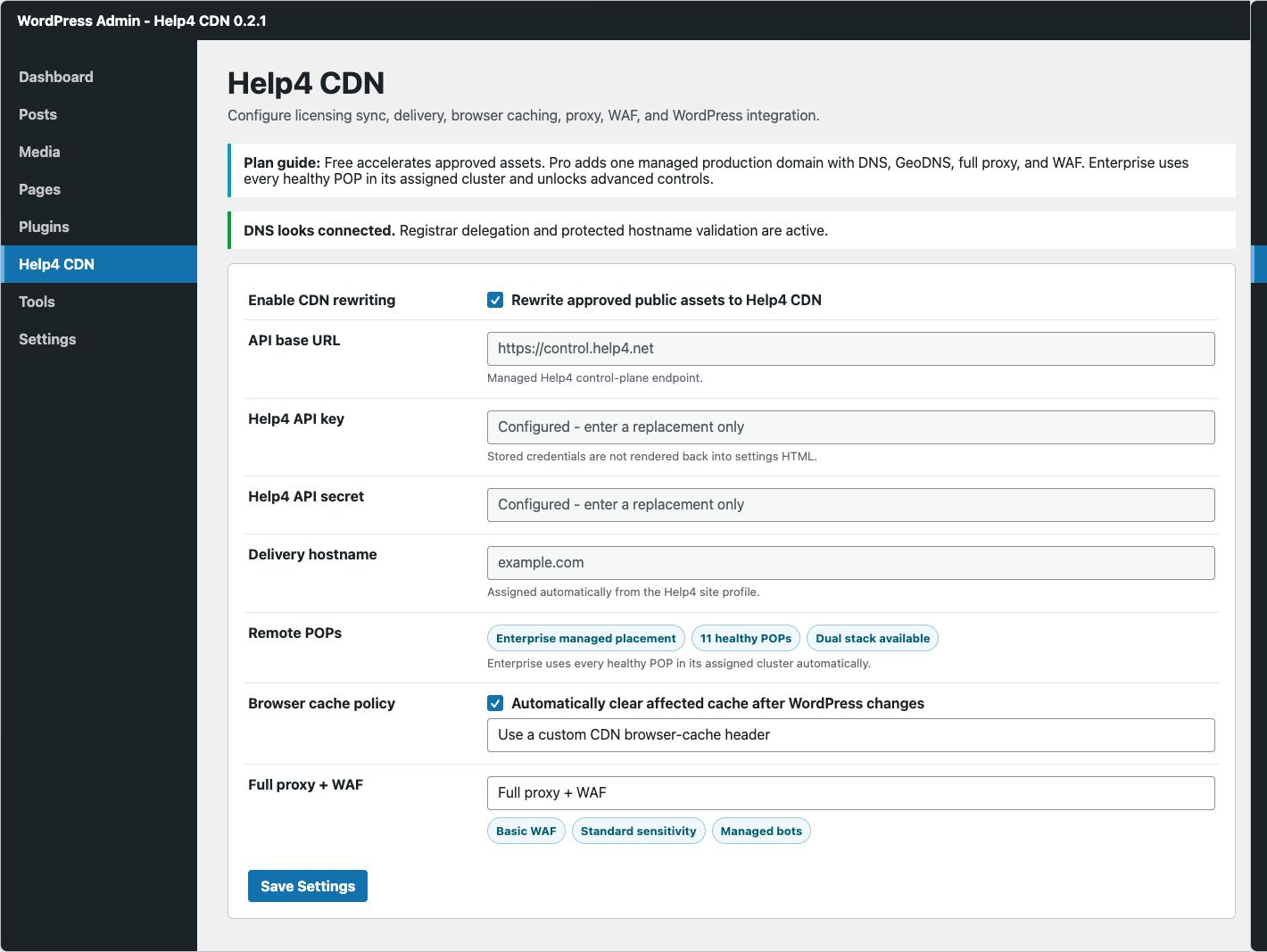
Connection and identity settings
| Setting | Purpose | Guidance |
|---|---|---|
| Enable CDN rewriting | Allows approved static asset URLs to use the assigned Help4 delivery hostname. | Enable after the site profile syncs and public assets have been tested. |
| API base URL | Help4 control-plane endpoint used for site-scoped operations. | Keep the managed value unless Help4 operations provides a replacement. |
| Help4 API key and secret | Preferred tenant authentication for control and JSON cache requests. | Both fields are password inputs. Blank saves preserve stored values; entering text replaces the credential. |
| Legacy bearer token | Backward-compatible authentication for older installations. | Leave blank unless an existing deployment still requires it. Migrate to key and secret. |
| Licensing base URL | Retrieves plugin version and plan entitlement. | Free can activate without paid registration. Paid services need the production domain assigned in Help4 CDN Domain Setup. |
| Delivery hostname | Read-only hostname returned by the Help4 site profile. | Do not type a POP or origin address into WordPress. Wait for the managed value. |
Hostname and origin settings
Custom hostname
Enter only the hostname assigned for the service. The status must become validated before a full-proxy cutover is treated as active.
White-label DNS records
Use the displayed record names and values exactly. Do not reuse another client's validation record.
Origin provider hint
Optional metadata for known platforms where the origin legitimately uses multiple addresses.
Allow multi-IP origin
Enable only when the origin provider and route inventory are understood. It is not a workaround for unexplained DNS drift.
POP coverage
Free supports up to five selected eligible asset locations. Pro and Enterprise use all eligible asset POPs automatically. Pro website ingress stays on DET01; Enterprise adds geographic full-site routing. The authenticated service profile determines entitlement, not a shared hosting IP.
Hosting origin IP addresses: use the real hosting server address from the service settings. The plugin can use the authenticated origin profile and never resolves public domain DNS to guess the origin. Do not enter an edge POP IP.
- Selected: the location is part of the requested placement.
- Unavailable right now: the location cannot be added until health or capacity permits it.
- IPv6-capable only: limits placement to POPs currently reporting dual-stack capability; available only where entitled.
- Unhealthy POP count: describes current cluster state and should not be treated as permanent placement.
Content and asset targeting
- Select the public content classes.
Choose homepage, pages, posts, products, or plan-default behavior. - Select approved asset classes.
Images, stylesheets, scripts, fonts, and other supported static types can be rewritten according to policy. - Use individual asset selection only when needed.
Specific paths are useful for a staged rollout, but broad sites are easier to operate with stable asset classes and versioned filenames. - Save and verify rendered output.
Inspect desktop and mobile pages, CSS, scripts, images, fonts, console errors, and interactive flows.
Requested state versus effective state
Several controls represent a request that the Help4 control plane still has to validate. Read the status fields after saving:
| State | Meaning | Action |
|---|---|---|
| Not registered yet | No Help4 site ID has been synchronized. | Verify API settings, service entitlement, and production-domain assignment. |
| DNS action needed | The assigned hostname is pending or the plan-specific DNS setup is incomplete. | Pro uses DET01 A records without changing nameservers. Enterprise follows delegation and GeoDNS validation. Preserve mail records. |
| Requested full proxy, effective static-only | The request is saved but DNS, TLS, hostname, origin, or route validation is incomplete. | Finish validation and resave; do not assume WAF coverage is active. |
| Active with healthy POPs | The control plane has an effective delivery profile and current healthy placement. | Run public rendered checks and confirm required application workflows. |
| Origin fallback | The delivery profile is protecting availability because assigned edge capacity or policy cannot serve normally. | Check status and contact Help4 with the timestamp and affected route. |
Update the plugin
- Take a WordPress backup.
Include the database, active plugins, themes, uploads, and configuration before production updates. - Open Dashboard, Updates.
Help4 CDN uses the Help4 updater feed and standard WordPress update flow. - Confirm the offered version.
The current stable release is0.2.2. The updater uses an immutable versioned ZIP for the selected release. - Apply the update.
Keep the browser open until WordPress reports success. - Verify configuration and public behavior.
Confirm the Help4 menu, site ID, cache tools, security center, effective proxy state, public rendering, and cache operations.
Troubleshooting matrix
| Problem | Evidence to check | Resolution |
|---|---|---|
| Plugin upload fails | WordPress/PHP upload limit and ZIP root | Use the official ZIP unchanged and correct the administrative upload limit. |
| Help4 menu is missing | Plugin activation and user capability | Activate Help4 CDN and sign in with an administrator account. |
| Credentials appear blank after saving | Configured placeholder text | This is intentional. Blank fields preserve stored secrets instead of rendering them into HTML. |
| Site ID stays empty | API URL, key/secret, assigned domain, licensing response | Correct the site identity and save again. Do not substitute another tenant's key. |
| Delivery hostname stays blank | Registration and hostname validation state | Finish service/domain provisioning, then resync. |
| Assets still use the origin | Enable rewriting, targets, public HTML source, browser console | Enable approved targets and clear the affected public page. |
| Full proxy remains pending | Nameservers, DNS, TLS, origin reachability, Help4 headers | Complete every validation gate. A DNS answer alone is not full-proxy proof. |
| Public page is visually broken | HTML marker, CSS/JS/image requests, content types, console, viewport | Disable the new rewrite/policy if needed, clear the exact paths, and compare with origin. |
| Cache clear fails | Site ID, credential scope, requested local path, last purge status | Retry one normalized local path; use the cache tutorial. |
| Security scan button is disabled | Managed scan eligibility and domain routing | Finish registration/routing. Core integrity checks remain local. |
| WAF/access controls are disabled | Plan, full-proxy capability, hostname validation | Use only controls entitled to the current effective plan. |
| Update is not offered | Licensing URL, outbound HTTPS, installed/stable version | Retry WordPress update check and provide sanitized updater status to support. |
Collect a useful support packet
Provide:
- Domain and affected public path
- UTC timestamp and visitor region
- Installed Help4 CDN and WordPress versions
- Requested and effective proxy/WAF states
- Sanitized response headers including the Help4 POP and cache policy
- Expected versus actual visible content or body marker
- Browser console error text when relevant